Forest Lantern Bundle: A Practical Guide to Rustic Vector Art
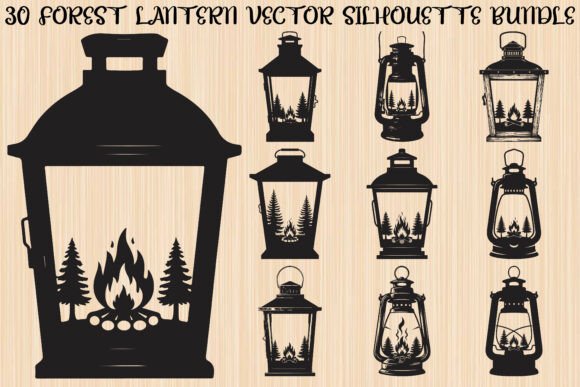
When you are curating digital assets for a creative project, the difference between a professional finish and a amateurish result often lies in the quality of your source files. The Forest Lantern Bundle has gained traction among crafters and designers because it taps into a timeless aesthetic: the intersection of outdoor adventure and cozy domesticity. This collection features thirty unique rustic designs that blend lanterns with forest-themed elements like pine trees and campfires. However, simply downloading these files is not enough to guarantee success. Many creators overlook critical technical details regarding file formats and scalability, leading to frustration during the cutting or printing process.
Understanding what makes this specific bundle valuable requires looking beyond the pretty previews. These silhouettes are designed to be versatile, serving as decorative vector artwork for a wide range of applications. Whether you are creating vinyl decals for a camper van, designing t-shirts for a family reunion, or crafting intricate paper cutouts for wedding invitations, the utility of these graphics depends on how well you understand their construction. Lanterns symbolize guidance and warmth, while forest motifs represent wilderness and exploration. This symbolic weight makes the bundle meaningful for handmade gifts and branding, but only if executed correctly.
Avoiding Common File Format Misunderstandings
One of the most frequent mistakes beginners make is assuming all digital image files are created equal. When you purchase the Forest Lantern Bundle, you receive six different file types: SVG, PNG, JPG, PDF, EPS, and AI. Using the wrong format for your specific tool can ruin your project before you even begin.
For users of electronic cutting machines like Cricut or Silhouette Cameo, the SVG file is non-negotiable. SVGs are scalable vector graphics, meaning they use mathematical paths rather than pixels. This ensures that when you resize a lantern design from two inches to twenty inches, the edges remain crisp and clean. A common error is attempting to use a PNG or JPG for cutting. These are raster images, composed of pixels. If you try to cut a raster image, the machine may struggle to identify the cut lines, resulting in jagged edges or failed cuts. Always prioritize the SVG for any physical cutting project.
Conversely, if you are sublimating a design onto a mug or printing it on a t-shirt, the PNG with a transparent background is your best friend. Many novices forget to check for transparency and end up with an unsightly white box around their forest silhouette. The Forest Lantern Bundle provides high-resolution PNGs specifically to avoid this issue, ensuring your design blends seamlessly onto colored fabrics or ceramics.
The Trap of Ignoring Design Complexity
Another overlooked detail is the complexity of the silhouette relative to the material being used. The thirty designs in this bundle range from simple, bold outlines to more intricate scenes featuring detailed pine branches and flickering flames. While intricate designs look stunning on screen, they can be a nightmare for certain materials.
For example, if you are using heat transfer vinyl (HTV) for a t-shirt, highly detailed forest elements can be difficult to weed—the process of removing excess vinyl. If the gaps between the lantern bars and the pine needles are too small, the vinyl may tear or fail to adhere properly after washing. A better approach is to match the design complexity to the material. Use the simpler, bolder lantern silhouettes from the bundle for HTV and vinyl decals. Reserve the more detailed, multi-element compositions for paper crafts, laser cutting, or direct-to-garment printing, where fine details are easier to reproduce.
Scalability and Proportion Errors
Because these are vector files, they are infinitely scalable. However, this freedom often leads to proportion errors. A design that looks balanced at a small size may appear cluttered or unrecognizable when blown up for a large wall art piece. Before committing to a final cut or print, always preview your design at the actual intended size.
Pay attention to the negative space. In silhouette art, the empty spaces are just as important as the filled areas. If you scale a design up significantly, ensure that the thin lines of the lantern frame do not become disproportionately thick compared to the delicate pine needles. Adjusting the stroke width or simplifying the design may be necessary for large-format applications. The included AI and EPS files are particularly useful here, as they allow professional designers to edit individual nodes and paths within software like Adobe Illustrator, giving you full control over the final proportions.
Licensing and Commercial Use Clarity
Many small business owners and entrepreneurs purchase bundles like this with the intention of selling finished products. A critical mistake is assuming that purchasing the file grants unlimited commercial rights without checking the specific license terms. While the Forest Lantern Bundle is marketed toward DIY craft projects and small businesses, you must verify whether you can sell the digital files themselves (usually prohibited) versus selling physical items made with the files (usually permitted).
Using these graphics for logos is another area requiring caution. Because these are pre-made stock vectors, they are not exclusive to you. If you use a lantern silhouette as the primary element of your brand logo, another business could legally use the same graphic. For unique branding, it is better to use these elements as part of a larger, customized composition or for product designs rather than core brand identity. This distinction protects your business from potential trademark conflicts and ensures your brand remains distinct.
Maximizing Versatility Across Projects
To get the most value from this bundle, think beyond the obvious applications. The rustic charm of these lanterns makes them ideal for more than just camping décor. Consider using them for:
- Wedding Invitations: The cozy, romantic vibe fits perfectly with woodland-themed weddings. Use the vector files to create custom monograms or border elements.
- Educational Materials: Educators can use the clear silhouettes for nature-themed lesson plans, shadow puppet theaters, or classroom decorations.
- Home Décor: Laser cut the designs from wood or acrylic to create layered wall art or night lights. The interplay of light and shadow through the lantern cutouts adds depth and warmth to any room.
Before finalizing any project, always perform a test run. Cut or print a single instance of the design on scrap material. This simple step allows you to check for weeding issues, color accuracy, and size appropriateness. It saves time, money, and material in the long run.
The Forest Lantern Bundle offers a robust set of tools for creators who appreciate the outdoors. By understanding the technical nuances of file formats, respecting the limitations of your materials, and verifying usage rights, you can transform these digital assets into high-quality, professional results. Avoid the common pitfalls of format mismatch and design overload, and you will find that these thirty rustic designs provide endless inspiration for your next creative endeavor.